


PlaceMaker Route Planner
3.852.00 Reviews
App Specs
- Version
- 1.0.126
- Updated On
- License
- Free
- Downloads
- 50,000+
- Developer
- Resting Cranes
- Categories
- Maps & Navigation
- Platform
- Android
Screenshots
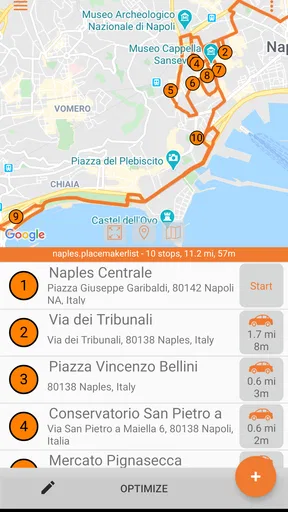
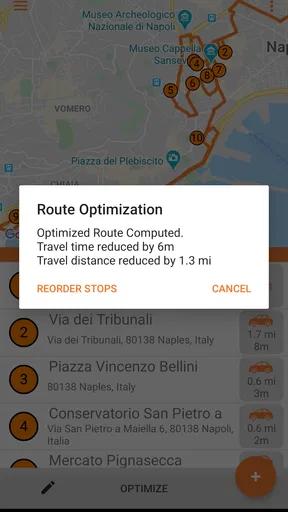
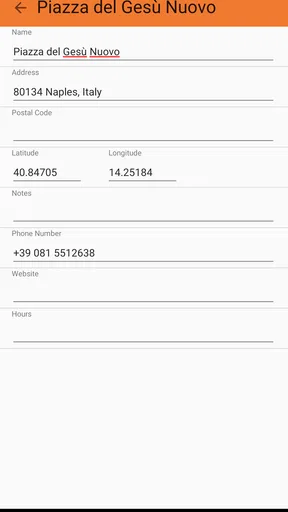
 Analysis by AppCompare
Sharing a phone for errands can make route planning feel like a small household project: one person knows the appointment time, another has the shopping list, and someone else is driving. I find PlaceMaker Route Planner most useful when one person takes responsibility for arranging the stops, then shares the resulting plan in conversation with everyone who needs to follow it. That practical role matters more than treating it as a family organizer; it is a navigation app, not a substitute for agreeing who is going where.
One driver, several household stops
Imagine a weekday when the driver needs to pick up a parcel, shop for dinner, and collect a relative from an appointment. Entering the stops together gives the planner a chance to organize the sequence instead of leaving the driver to improvise between destinations. I would settle any appointment with a fixed time first, then use the route order as a planning aid rather than assuming the shortest-looking sequence automatically fits the day.
That distinction is especially useful in a shared household. A route can help the driver avoid unnecessary backtracking, but it cannot decide which person is available, whether a shop is open, or how long a visit will take. I’d use the app to answer “what order should I try?” and confirm the human details separately. This keeps the plan helpful without asking navigation to solve a coordination problem it was not built for.
Keep the planning role clear
When several people use one device, I prefer to be deliberate about who enters and edits the stops. The person planning should check the destination list before setting off, particularly if another household member has supplied an address verbally. A simple read-back—destination names and intended order—can prevent a route from being technically sensible but wrong for the actual errand.
PlaceMaker is made by Resting Cranes and is a free Android app in the maps and navigation category. It has an average rating of 3.8 from around 211 ratings, with over 50,000 installs. Those figures suggest that people have tried it, but they don’t tell me whether it will fit a particular household’s routine. I’d judge it by a small test route before relying on it for a day with tight commitments.
The current version is 1.0.117, and the app is rated for Everyone. It is free to install, with optional in-app purchases listed from $4.99 to $17.99 per item. I would check the purchase details on the device before confirming anything, especially if children or other family members can use the same store account. A shared phone does not automatically mean everyone should have the same authority to make purchases or change a route.
Coordination without assuming shared controls
A useful household workflow is to have the planner enter destinations while the driver reviews the route before leaving. If someone else is riding along, they can help check the next stop while the driver concentrates on the road. I would not treat the app as a shared calendar or assume it synchronizes plans between separate accounts; the safer approach is to communicate the route in whatever way the household already uses.
Worth Reading Before You Choose

EA SPORTS FC Mobile 26 Is a Bigger Football Game, but It Takes Time

Flipboard Shows What News Apps Must Do Beyond the Feed

Switching to Android Auto Means Rethinking Your Driving Routine

Google Calendar Makes a Crowded Week Easier to Manage

Ludo King Makes the Most of the Minutes Between Plans

Baby Panda World Brings Quick Play to Modern Phones, but Its Game Library Feels Busy
For recurring errands, a little preparation can make the route more dependable. Group stops by purpose, check spelling and address details, and distinguish destinations that must happen at a particular time from flexible ones. If a plan changes, pause somewhere safe and revise it rather than trying to resolve the list while driving. These are ordinary habits, but they make a multi-stop planner much more useful than entering a long, unchecked list in a hurry.
Age, trust, and the right expectations
The Everyone rating makes the app suitable for a broad audience, but I would still give a younger family member a clear job rather than handing over the whole trip plan without discussion. A child might help read out the next destination while an adult remains responsible for the route and driving decisions. The rating describes the app’s content context; it does not establish that it includes parental controls, family profiles, or safeguards for shared accounts.
For privacy and account boundaries, I’d use the device’s normal user and purchase settings instead of assuming the route planner separates household members. Before lending a phone, consider whether the person needs access to the whole device or only needs to help with a destination. That is a sensible precaution for any navigation app, and particularly relevant when a phone also holds personal accounts and payment access.
Against opening a general-purpose maps app and adding stops as you go, a dedicated route planner is appealing when the order of several destinations is the main problem. A regular map remains the better choice when the priority is simply finding one place, checking nearby businesses, or relying on familiar navigation habits. I’d also keep a conventional map app available as a backup for an unfamiliar area or a plan that changes unexpectedly; a route organizer should not be the only tool a driver depends on.
Planning routes with less household guesswork
In my experience, the strongest reason to try PlaceMaker Route Planner is the specific chore of arranging several stops into a workable trip. It is less compelling if everyone expects a shared family dashboard, automatic scheduling, or a way to manage who can edit plans. I would start with a low-pressure outing, compare the proposed sequence with the day’s real constraints, and decide whether its planning style suits the people who will actually use it.
Getting Started with PlaceMaker
Right from the get-go, PlaceMaker is designed to be user-friendly. The interface is sleek, with a minimalist design that doesn’t overwhelm you with options. Downloading the app was straightforward, and setup took just a few minutes. Once you're in, it feels like the app is ready to take you on a journey!
What I love about this app is how it immediately asks you what you need. Whether you're planning a delivery route, a road trip, or just trying to optimize your errands, PlaceMaker tailors its features to suit your needs. It’s like the app is having a little chat with you, getting to know what you’re about.
Features That Stand Out
One of the standout features of PlaceMaker is the ease with which you can plot multiple stops. We’ve all been there—trying to figure out the best way to hit several places without doubling back. This app does all the heavy lifting for you. Just punch in your stops, and it calculates the most efficient route.
Another cool feature is the traffic prediction. No one likes getting stuck in traffic, especially when you’re on a tight schedule. PlaceMaker gives you real-time traffic updates and suggests alternative routes to keep your journey smooth.
And if you’re someone who loves a bit of data, this app has some neat analytical tools. It tracks your routes, time, and even fuel consumption, giving you a comprehensive overview of your travels.
Day-to-Day Use
Using PlaceMaker in daily life has been a game-changer. I decided to test it out on a regular weekday to see how it holds up. I had a list of errands, and instead of my usual chaos, I simply entered my stops into the app. It was like magic! The app optimized my route, and I was able to save both time and gas.
It’s also worth mentioning how reliable the app is. It didn’t crash or lag, which is a huge plus in my book. Whether you’re using it for business or personal use, reliability is key, and PlaceMaker delivers.
Wrapping Up
In the end, PlaceMaker Route Planner is more than just a map app; it’s a smart assistant that helps you navigate life efficiently. It's perfect for anyone looking to streamline their routes, whether you're a delivery driver, a road trip enthusiast, or just someone who wants to get the most out of their day.
If you’re tired of wasting time and fuel, give PlaceMaker a shot. It’s like having a little bit of navigation magic on your phone. Happy traveling!
Pros
- Easy-to-use interface for quick planning.
- Supports multiple stops per route.
- Integration with popular map services.
- Real-time traffic updates included.
- Customizable route options available.
Cons
- Requires internet for optimal performance.
- Limited offline functionality.
- Some features are behind a paywall.
- Occasional ads in the free version.
- Initial setup can be time-consuming.
FAQs for PlaceMaker Route Planner
What is PlaceMaker Route Planner and how does it work?
PlaceMaker Route Planner is a mobile application designed to optimize your travel routes efficiently. It allows users to input multiple destinations and generates the most efficient route to minimize travel time. The app uses advanced algorithms and integrates with real-time traffic data to ensure users reach their destinations quickly and efficiently.
Can I use PlaceMaker Route Planner offline?
PlaceMaker Route Planner primarily requires an internet connection to access real-time traffic data and to compute optimal routes. However, users can save routes for offline access, which is particularly useful in areas with poor connectivity. For the best experience, ensure you have internet access when planning and updating routes.
Is PlaceMaker Route Planner available for both Android and iOS devices?
Yes, PlaceMaker Route Planner is available for download on both Android and iOS platforms. You can find it on the Google Play Store for Android devices and the Apple App Store for iOS devices. Ensure your device meets the minimum system requirements for optimal performance.
Does PlaceMaker Route Planner support multiple stops and route customization?
Absolutely, PlaceMaker Route Planner supports multiple stops, allowing users to add several destinations to their journey. You can customize routes by rearranging stops or setting preferences for specific routes, such as avoiding toll roads or highways, to tailor your travel experience according to your needs.
Are there any subscription fees or in-app purchases within PlaceMaker Route Planner?
PlaceMaker Route Planner offers a free version with basic features. However, for access to premium features such as advanced route optimization, ad-free usage, and priority customer support, a subscription fee is required. Users can choose from various subscription plans based on their needs.


